How to Create a New Option
The screenshot below (taken in RDMO 2.4.4) shows the form for creating a new option. The numbered fields are explained in the sections that follow.
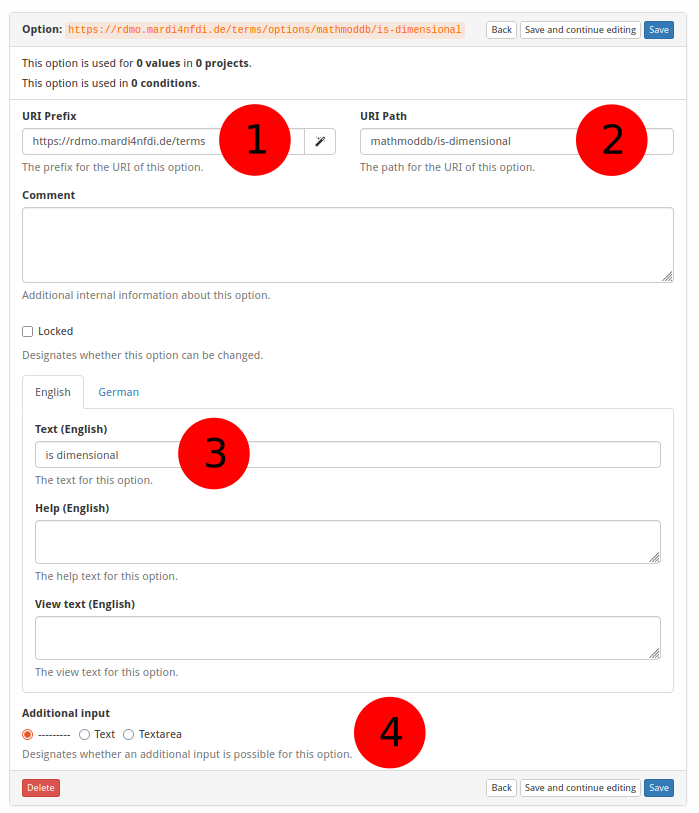
① URI prefix
The base URI that scopes all items belonging to a particular source. For MaRDMO-specific items this is:
https://rdmo.mardi4nfdi.de/terms
② URI path
The path that encodes the vocabulary and the individual option, appended to the prefix. It consists of two parts separated by a slash:
- the vocabulary name (e.g.
mathmoddb) - a slug identifying the option (e.g.
is-dimensional)
Example for the Is Dimensional option:
mathmoddb/is-dimensional
The full URI of the option is therefore:
https://rdmo.mardi4nfdi.de/terms/options/mathmoddb/is-dimensional
③ Labels
The English and German labels of the option that are displayed to the user in the interview. Both language variants should be filled in so that the interview renders correctly regardless of the user's language setting.
④ Additional input
Controls whether the option presents an extra text field next to the checkbox in the interview. Leave this off for pure boolean properties (e.g. Is Dimensional). Enable it when the option requires supplementary data from the user — for example, the DOI option provides a text field where the user can enter the actual DOI string.