How to Create a New Question Set
The screenshot below (taken in RDMO 2.4.4) shows the form for creating a new question set. The numbered fields are explained in the sections that follow.
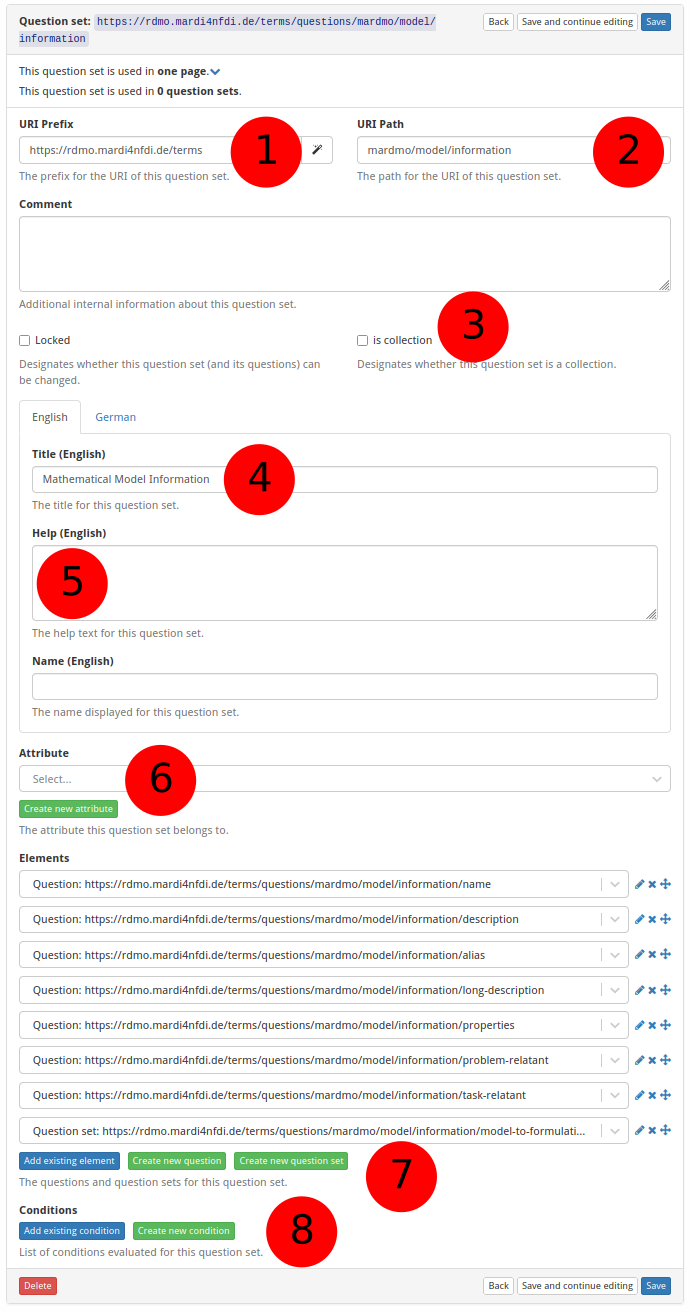
① URI prefix — The base URI that scopes all items belonging to a particular source. For MaRDMO-specific items this is: https://rdmo.mardi4nfdi.de/terms
② URI path — The path that uniquely identifies this question set within the prefix. For MaRDMO question sets this always starts with mardmo, followed by the entity class and a key, e.g. mardmo/model/information. Together with the prefix this yields the full URI https://rdmo.mardi4nfdi.de/terms/questions/mardmo/model/information.
③ Is collection — If enabled, the question set can appear multiple times per interview page, allowing users to document several instances of the same entity. Here: not a collection.
④ Title — The label displayed as the question set heading, in English and German. Here:
- English:
Mathematical Model Information - German:
Mathematisches Modell Informationen
⑤ Help text — Optional additional guidance shown alongside the question set heading. Accepts HTML formatting, provided in English and German. Here: not provided.
⑥ Attribute — Optionally links the question set to an attribute. An existing attribute can be selected or a new one created (see How to Create a New Attribute).
⑦ Questions and question sets — Add existing questions or question sets to this question set, or create new ones (see How to Create a New Question). Question sets can be nested.
⑧ Condition — Optionally restrict when this question set is shown. An existing condition can be selected or a new one created (see How to Create a New Condition).