How to Create a New Section
The screenshot below (taken in RDMO 2.4.4) shows the form for creating a new section. The numbered fields are explained in the sections that follow.
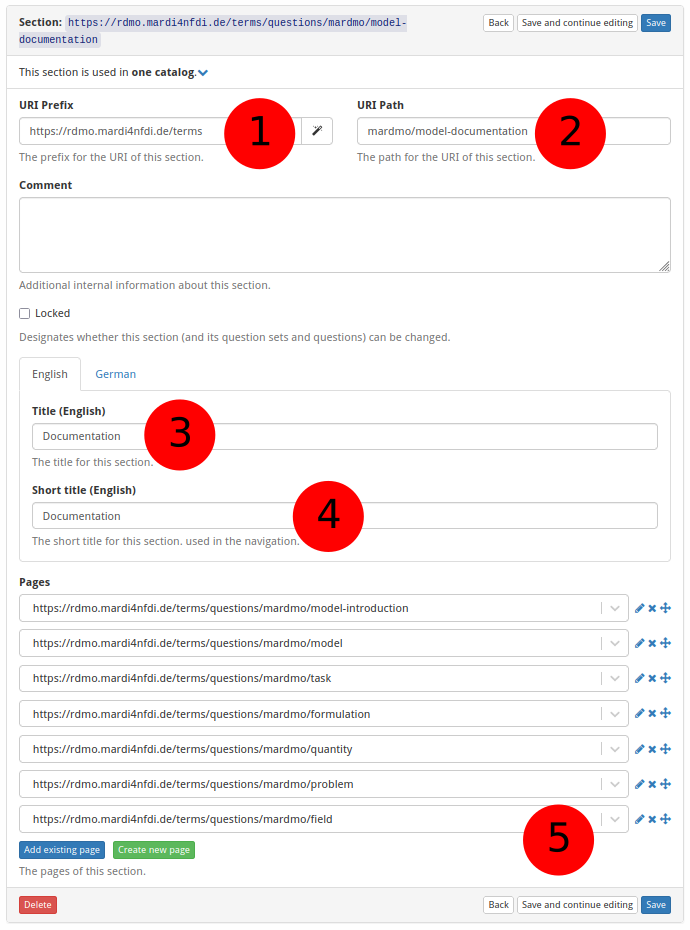
① URI prefix — The base URI that scopes all items belonging to a particular source. For MaRDMO-specific items this is: https://rdmo.mardi4nfdi.de/terms
② URI path — The path that uniquely identifies this section within the prefix. Each MaRDMO catalog contains two sections. The documentation section follows the pattern mardmo/<datatype>-documentation, e.g. mardmo/model-documentation for the model catalog. The reference section follows the pattern publication-<datatype>, e.g. publication-model. Together with the prefix the documentation section yields the full URI https://rdmo.mardi4nfdi.de/terms/questions/mardmo/model-documentation.
③ Title — The label displayed as the section heading, in English and German. Here (documentation section):
- English:
Documentation - German:
Dokumentation
④ Short title — An abbreviated title shown in the interview navigation, in English and German. Here:
- English:
Documentation - German:
Dokumentation
⑤ Pages — Add existing pages to this section or create new ones (see How to Create a New Page).