How to Create a New Question
The screenshot below (taken in RDMO 2.4.4) shows the form for creating a new question. The numbered fields are explained in the sections that follow.
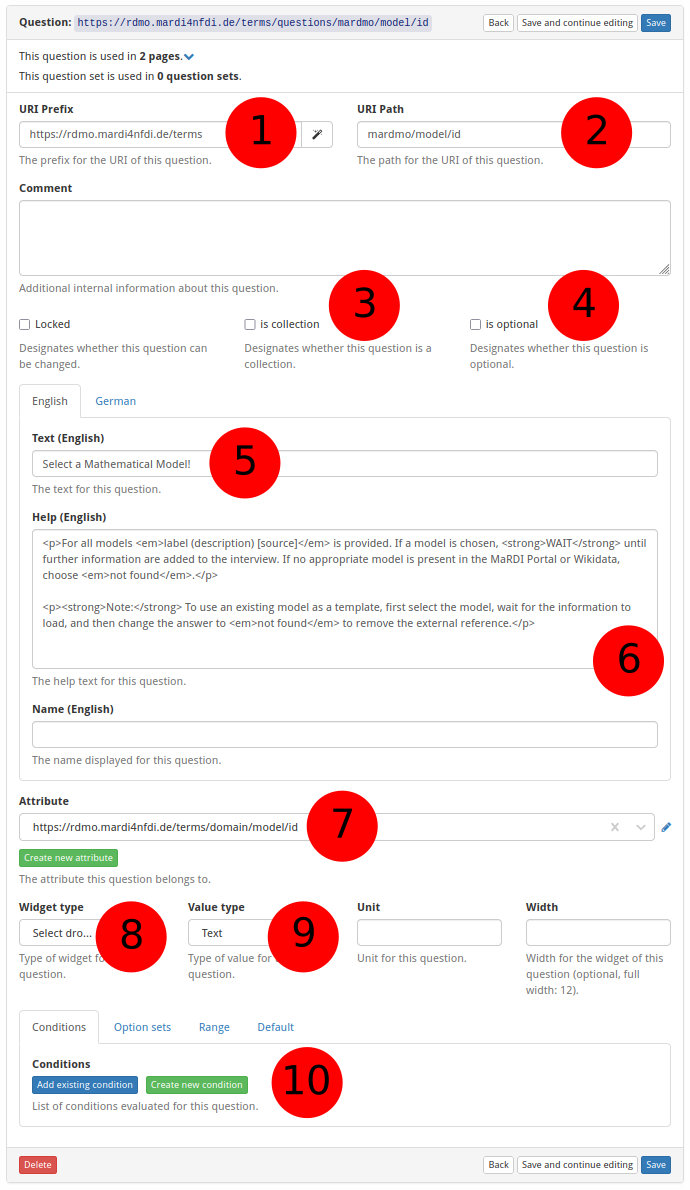
① URI prefix — The base URI that scopes all items belonging to a particular source. For MaRDMO-specific items this is: https://rdmo.mardi4nfdi.de/terms
② URI path — The path that uniquely identifies this question within the prefix. For MaRDMO questions this always starts with mardmo, followed by the entity class and a key, e.g. mardmo/model/id. Together with the prefix this yields the full URI https://rdmo.mardi4nfdi.de/terms/questions/mardmo/model/id.
③ Is collection — If enabled, several answers can be provided for this question. Here: not a collection.
④ Is optional — Optional questions are not counted in the progress bar when left unanswered. Here: not optional.
⑤ Question text — The question displayed to users, in English and German. Here:
- English:
Select a Mathematical Model! - German:
Wählen Sie ein mathematisches Modell aus.
⑥ Help text — Additional guidance shown to users alongside the question. Accepts HTML formatting, provided in English and German. Here:
English:
<p>For all models <em>label (description) [source]</em> is provided. If a model is chosen, <strong>WAIT</strong> until further information are added to the interview. If no appropriate model is present in the MaRDI Portal or Wikidata, choose <em>not found</em>.</p>

<p><strong>Note:</strong> To use an existing model as a template, first select the model, wait for the information to load, and then change the answer to <em>not found</em> to remove the external reference.</p>
German:
<p>Für alle Modelle wird <em>Name (Beschreibung) [Quelle]</em> angegeben. Wenn ein Modell ausgewählt wird, <strong>WARTEN</strong> Sie, bis weitere Informationen zum Interview hinzugefügt werden. Falls kein passendes Modell im MaRDI Portal oder Wikidata vorhanden ist, wählen Sie <em>not found</em>.</p>

<p><strong>Hinweis:</strong> Um ein bestehendes Modell als Vorlage zu verwenden, wählen Sie zunächst das Modell aus, warten Sie, bis alle Informationen geladen wurden, und setzen Sie anschließend die Antwort auf <em>not found</em>, um den Bezug zur externen Quelle zu entfernen.</p>
⑦ Attribute — The attribute this question is linked to. An existing attribute can be selected or a new one created (see How to Create a New Attribute). Here: https://rdmo.mardi4nfdi.de/terms/domain/model/id
⑧ Widget type — Controls the input element shown to the user. Select Dropdown provides a dropdown with autocomplete; other options include Text, Checkboxes, and more. Here: Select Dropdown.
⑨ Value type — The expected data type of the answer, e.g. Text, Integer, Float. When PROJECT_VALUES_VALIDATION = True is set in the configuration, answers of the wrong format result in a validation error and cannot be saved; this flag defaults to False. Here: Text.
⑩ Conditions and optionsets — One or more conditions or optionsets can be attached to a question. Existing entries can be selected or new ones created (see How to Create a New Condition and How to Create a New Optionset). Here: https://rdmo.mardi4nfdi.de/terms/options/model as optionset.